Ultimate UK Guide to Choosing a Network Cable Checker
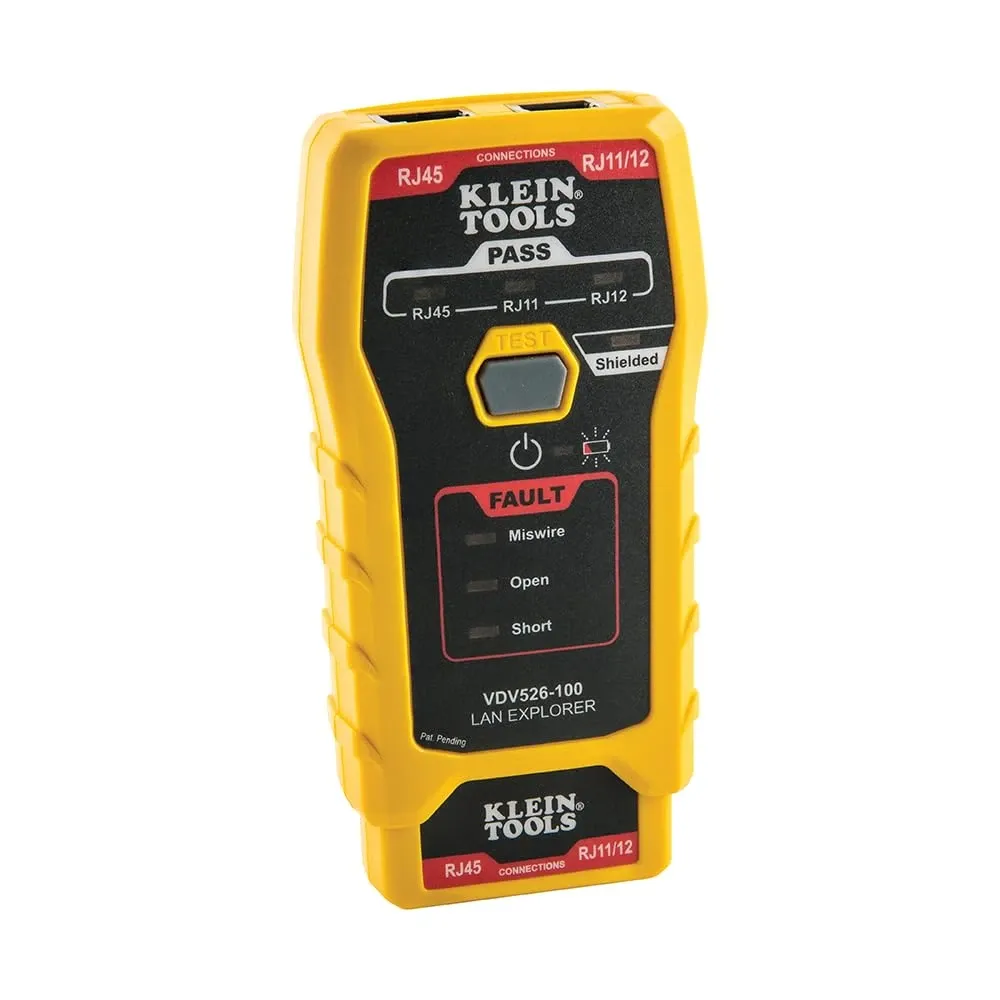
TL;DR: What is a network cable checker? A network cable checker is a vital diagnostic tool used by IT professionals to test the connectivity, pinouts, and overall integrity of data and voice cables, such as RJ45, RJ11, and RJ12. It instantly identifies critical faults like open circuits, short circuits, and miswires. Based on our extensive testing at NetworkCab, investing in a reliable tester with comprehensive wiremapping is the most effective way to prevent costly network downtime across UK infrastructure.
Key Takeaways
- A reliable network cable checker is essential for diagnosing opens, shorts, and miswires in RJ45, RJ11, and RJ12 infrastructure.
- Network downtime costs UK businesses thousands of pounds per minute; therefore, rapid fault location using an ethernet continuity tester mitigates these losses.
- Understanding the distinction between basic wiremappers, qualification testers, and certification tools is crucial for optimising UK IT budgets.
- Always verify your pinouts against T568A or T568B standards when terminating Cat5e, Cat6, or Cat6a cabling.
- Modern infrastructure demands versatile tools acting as a Cat5 cable tester, telephone cable tester, and network cable line tester all in one.
What is a Network Cable Checker and Why Do You Need One?
Fundamentally, a network cable checker is a purpose-built device used to verify the electrical continuity and signal integrity of structured cabling. According to IT industry analysts at Gartner, the average cost of network downtime hovers around £4,500 per minute. Consequently, for UK enterprises, SMEs, and public sector organisations like the NHS, a single faulty cable can disrupt patient databases, halt financial transactions, and sever vital communication lines. Based on our decade of hardware testing at NetworkCab, we know firsthand that when a network port goes dead, guessing the cause is a luxury no IT professional can afford. This is precisely where a high-quality data cable tester becomes the most valuable commercial tool in your kit.
Furthermore, whether you are a network engineer fitting out a new commercial office in central London, a telecom technician upgrading legacy infrastructure, or an AV installer terminating data lines for smart homes, the integrity of your physical layer dictates the reliability of the entire network. Indeed, cabling faults account for up to 70% of all network connectivity issues. A terminated RJ45 plug might look perfect to the naked eye; however, micro-fractures in the copper, a poorly punched down keystone jack, or a crossed pair inside the sheath will instantly degrade or destroy signal transmission.
In the UK, where data infrastructure is heavily regulated, adhering to standards is paramount. According to UK guidelines such as BS EN 50173 for structured cabling, verifying your work post-installation is not merely best practice—it is a strict compliance necessity. Investing in a robust tool that functions seamlessly as a Cat5 cable tester, telephone cable tester, and network cable line tester allows you to quickly check RJ45, RJ11, and RJ12 cabling for opens, shorts, and miswires. As a result, this guide will walk you through the technical specifications, fault-finding methodologies, and budget considerations for selecting the ultimate testing equipment for British infrastructure environments.
What Are the Different Types of Network Cable Testers?
It is important to note that not all cable testers are created equal. The physical layer of a modern UK office or industrial facility is a complex web of varying cable types, each serving a distinct purpose. Understanding the specific tool required for each medium ensures accurate diagnostics and prevents damage to active networking equipment.
How Does an Ethernet Continuity Tester Work?
The standard ethernet continuity tester is the reliable workhorse of the IT industry. Designed primarily for Twisted Pair cabling (Cat5, Cat5e, Cat6, Cat6a, and Cat7), these devices verify the electrical connections from one end of the cable to the other. They typically utilise a main unit and a remote terminator. When connected to both ends of a cable run, the tester sends a small electrical current down each of the eight individual wires (four pairs) within the Ethernet cable.
Basic models will use a series of LEDs to indicate whether the current successfully travels down pin 1 and returns on pin 1, pin 2 to pin 2, and so forth. Meanwhile, more advanced models feature LCD screens that provide a graphical wiremap. If you are regularly terminating Cat5e cables for local area networks, you might want to review our comprehensive guide on the Best Cat5 Cable Tester & Cat5e Continuity Guide UK to understand the specific nuances of testing gigabit-capable infrastructure.
Can You Use a Network Tester for Voice Cables?
While IP telephony (VoIP) has largely superseded traditional analogue phone lines in modern UK business environments, millions of miles of legacy copper still exist. BT's Openreach network and internal PBX systems frequently rely on RJ11 and RJ12 connectors. Therefore, a dedicated voice cable tester (or a comprehensive network tester with integrated voice capabilities) is absolutely essential for diagnosing these systems.
Voice cables typically use fewer pairs than Ethernet—often just one or two pairs (two to four wires). A standard RJ45 tester may not properly interface with an RJ11 plug without an adapter, and crucially, forcing an RJ11 plug into an RJ45 jack can permanently damage the pins inside the tester. High-quality network cable checkers include dedicated ports for voice lines, allowing technicians to diagnose tip and ring faults effortlessly. For a deeper dive into telephony diagnostics, consult our guide on How to Use a Telephone Cable Tester (RJ11/RJ12) UK.
Do Network Testers Check Coaxial Cables?
Coaxial cables (like RG59 or RG6) remain prevalent in CCTV installations, broadband deployments (such as Virgin Media's HFC network), and satellite television across the UK. Coaxial testers specifically check the continuity of the inner conductor and the outer braided shield. While many dedicated IT technicians focus solely on twisted pair, our testing at NetworkCab confirms that AV installers and security technicians benefit greatly from multi-function testers that include a BNC or F-connector port for coaxial continuity testing.
What Features Should You Look for in a Data Cable Tester?
When evaluating a data cable continuity tester for commercial use, the feature set directly dictates how much time you will save during troubleshooting. A basic £10 tester will simply tell you a cable is broken; conversely, a premium tester will tell you exactly where and why it is broken.
What is Wiremapping in Network Testing?
A wiremap is the visual representation of how the pins on one end of a cable correspond to the pins on the other. In the UK, data cabling is almost universally terminated using the T568B standard, although T568A is occasionally found in legacy or residential installations. Based on UK industry standards, a proficient wiremapper will instantly identify the following faults:
- Open Circuits: A wire is broken or not properly punched down into the IDC (Insulation Displacement Connector) block. Consequently, the electrical signal cannot reach the other end.
- Short Circuits: Two copper conductors are touching each other, usually due to stripped insulation or a stray strand of wire bridging two pins in the RJ45 plug.
- Miswires: The wires are connected to the wrong pins. For example, pin 1 on the local end is incorrectly connected to pin 2 on the remote end.
- Split Pairs: This is a critical fault that basic LED testers often miss. It occurs when two wires from different twisted pairs are incorrectly grouped together. Although the cable will pass a simple continuity test (pin 1 goes to pin 1), the lack of proper twisting will result in massive crosstalk, thereby destroying data transmission speeds.
- Reversed Pairs: A complete pair is inverted (e.g., the solid and striped wires are swapped at one end).
Ready to try NetworkCab?
Shop Now — £197.21